
Routing
How backend APIs map requests to endpoints: static, dynamic, and nested routes, path and query parameters, and versioning that keeps old clients working.
What is Routing?
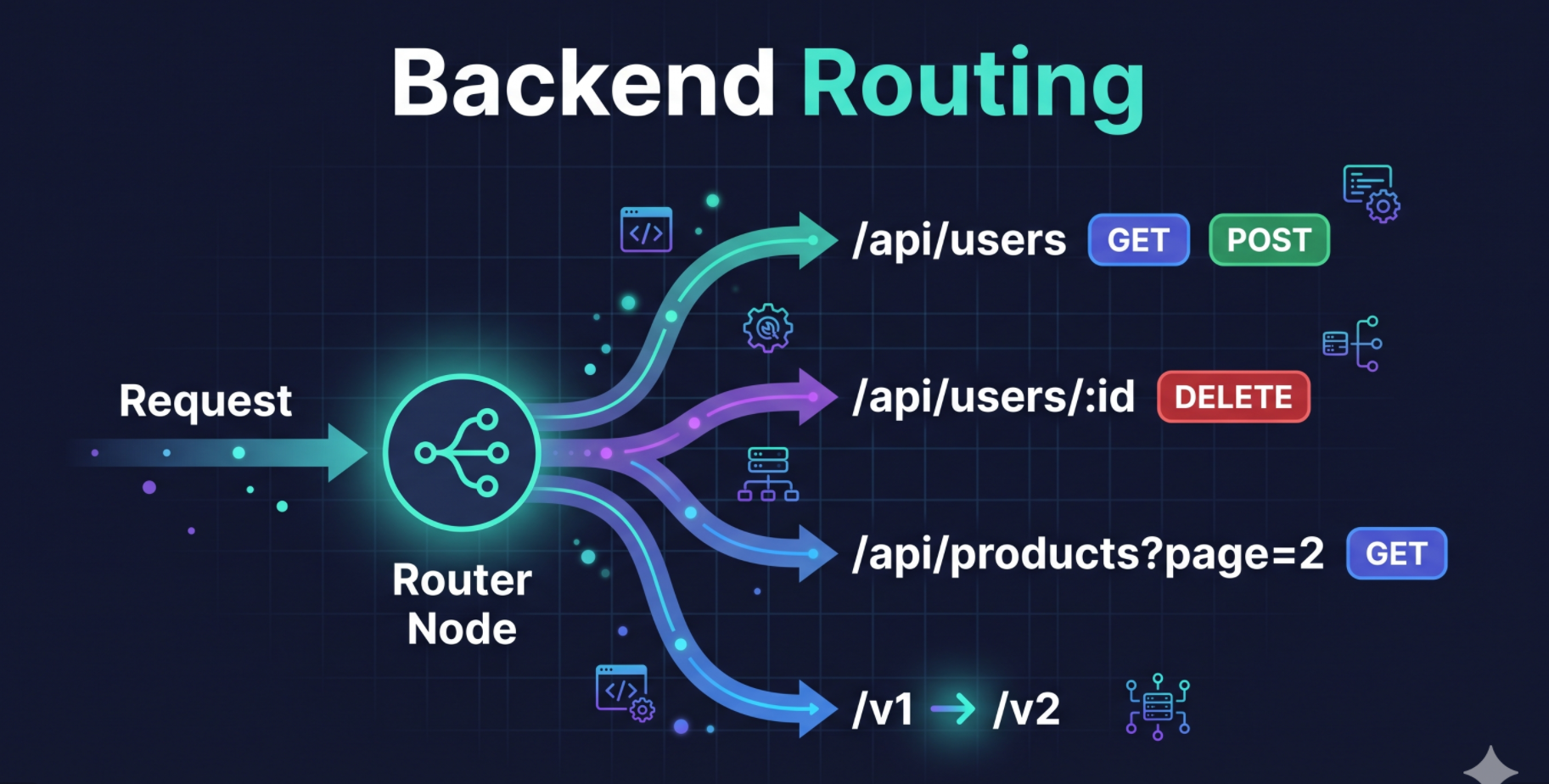
Routing is the process of determining which endpoint to call based on the request.
HTTP request defines "WHAT" i.e. the intent of the request and through routing we can define "WHERE" i.e. the endpoint to call to do the job and "WHICH" i.e. the method to use to do the job.
To simplify the routing is attaching of the endpoint to called with logic that will be execute on request
HTTP verb and url route combined creates a unique endpoint the serves a functionality on server.
Example:
GET /api/usersthis return list of users
Types of Routing
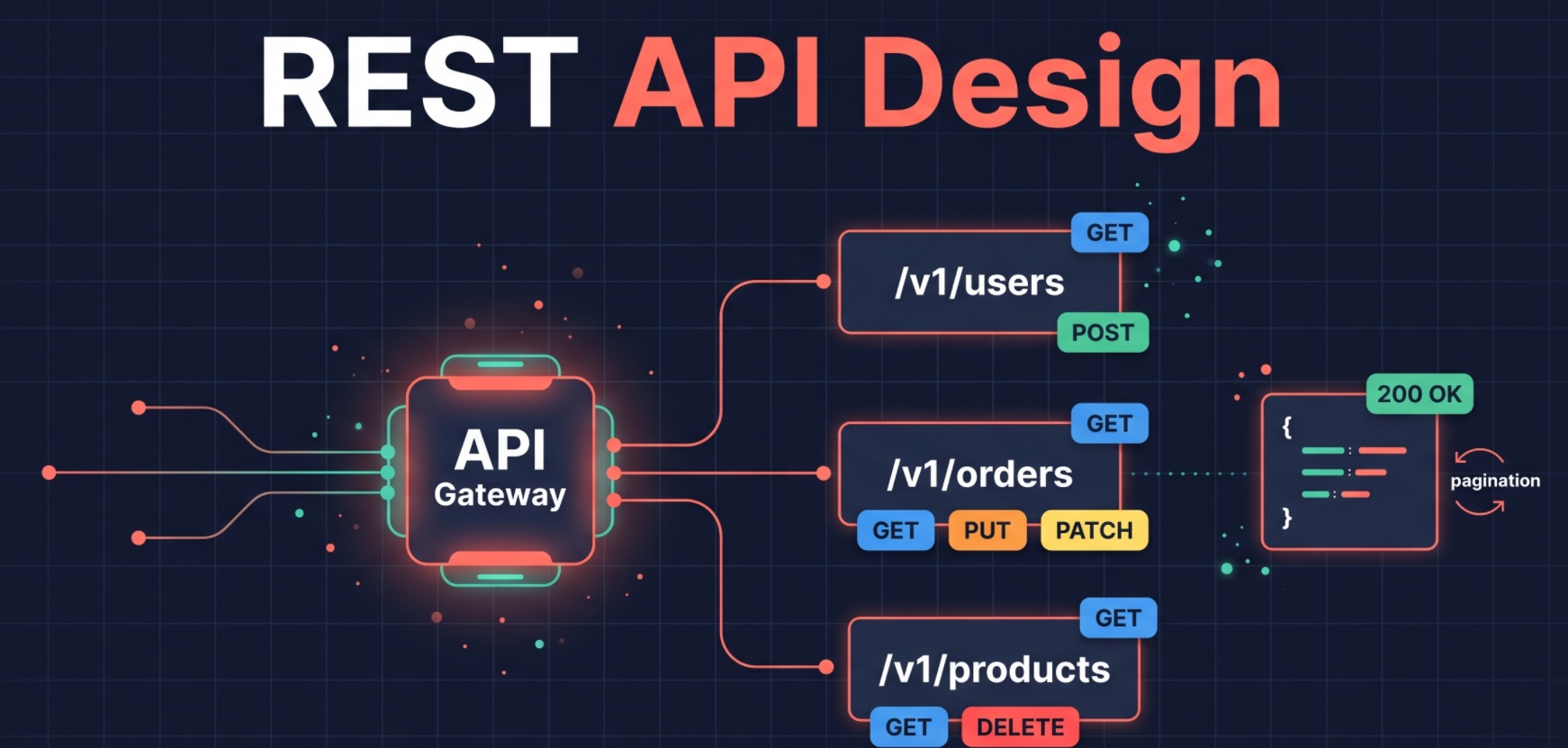
1. Static Routing
when the url is constant / unchanged and does take any parameters to route to the endpoint its called static routing
GET /api/users: return list of usersPOST /api/users: crete a new user
2. Dynamic Routing
when the url is dynamic and does get its value from parameters in url which decides which endpoint to call and which logic to execute on request is called dynamic routing
GET /api/users/1: return user with id 1DELETE /api/users/1: delete user with id 1
In backend logic we can write above endpoint as
GET /api/users/:userId: userId is variable that get assigned value from url which will decide which user to returnDELETE /api/users/:userId: userId is variable that get assigned value from url which will decide which user to delete
Dynamic routing can take 2 types of parameters
Path Parameters
Query Parameters
1. Path Parameters
Path parameters are values in the URL path, separated by
/, used to route to the endpoint.They are defined with
:followed by the parameter name.They identify which resource to operate on.
A url can have multiple path parameters which are separated by
/.Example:
Fetching a single resource:
GET /api/orders/:orderIdreturns one specific order.Nested resources:
GET /api/users/:userId/posts/:postIdreturns one post belonging to one user.
2. Query Parameters
Query parameters are key value pairs in the URL query string, appended after
?, used to route to the endpoint.They are defined with
?followed by the parameter name.A url can have multiple query parameters which are separated by
&.Example:
Filtering:
GET /api/products?category=shoesreturns only products in that category.Pagination:
GET /api/posts?page=2&limit=10returns the second set of 10 posts.Sorting:
GET /api/users?sort=name&order=ascreturns users sorted alphabetically.
Nested Routing
With nested routing multiple path parameter can be collected in one endpoint
Semantically nested routing used to access nested resources like classrooms and students or users and posts
Example:
Fetching a student with specific classroom:
GET /api/classrooms/:classroomId/students/:studentIdreturns one specific student belonging to one classroom.Fetching a post with specific user:
GET /api/users/:userId/posts/:postIdreturns one post belonging to one user.
Route Versioning
Route versioning is a technique to handle changes in the API by adding a version number to the URL.
It allows you to make changes to the API without breaking existing clients.
Example: Problem Statement: In the past version of application backend is serving the product list at
/api/productsin which result was a list of products.{ "success": true, "data": { "products": [ { "id": "prod_001", "name": "Running Shoes", "category": "shoes", "price": 89.99, "currency": "USD", "inStock": true }, { "id": "prod_002", "name": "Trail Sneakers", "category": "shoes", "price": 109.5, "currency": "USD", "inStock": false }, { "id": "prod_003", "name": "Canvas Backpack", "category": "bags", "price": 49.0, "currency": "USD", "inStock": true }, { "id": "prod_004", "name": "Insulated Water Bottle", "category": "accessories", "price": 24.99, "currency": "USD", "inStock": true }, { "id": "prod_005", "name": "Wool Crew Socks", "category": "apparel", "price": 14.5, "currency": "USD", "inStock": true }, { "id": "prod_006", "name": "Performance Cap", "category": "apparel", "price": 19.99, "currency": "USD", "inStock": false }, { "id": "prod_007", "name": "Gym Duffel Bag", "category": "bags", "price": 64.0, "currency": "USD", "inStock": tru e} ] }, "meta": { "total": 7, "page": 1, "limit": 10 }, "error": null }Now as new with newer modifications application is serving the product object instead of list of products.
  {
    "success": true,
    "data": {
      "products": {
        { "id": "product-001", "name": "Running Shoes", "category": "category-01-shoe", "price": "89.99 USD", "inStock": "yes" },
        { "id": "product-002", "name": "Trail Sneakers", "category": "category-01-shoe", "price": "109.5 USD", "inStock": "no" },
        { "id": "product-003", "name": "Canvas Backpack", "category": "category-02-bags", "price":" 49.0 USD", "inStock": "yes" },
        { "id": "product-004", "name": "Insulated Water Bottle", "category": "category-03-accessories", "price": "24.99 USD", "inStock": "yes" },
        { "id": "product-005", "name": "Wool Crew Socks", "category": "category-04-apparel", "price":" 14.5 USD", "inStock": "yes" },
        { "id": "product-006", "name": "Performance Cap", "category": "category-04-apparel", "price": "19.99 USD", "inStock": "no" },
        { "id": "product-007", "name": "Gym Duffel Bag", "category": "category-02-bags", "price":" 64.0 USD", "inStock": "yes"}
      }
    },
    "meta": { "total": 7, "page": 1, "limit": 10 },
    "error": null
  }
With above changes application directly application which are using old API version will crash or will not work as expected. In these cases as backend developer we need to support both version of API.
Solution: We can add version number / names to the URL to indicate which version of API is being used like f or old API version we can user /api/products/v1 and mark them as deprecated so other developers can still use them and start migrating to new API version in upcoming updates. For new API version we can use /api/products/v2 After this api/products/v1 will serve the product list till the is deprecated and api/products/v2 will serve the product object.
About the author
- My journey started as a Computer Engineering student with a deep curiosity about how software systems are built from the ground up. During college, I dove into web development, databases, and machine learning — shaping a strong foundation in problem-solving and software engineering. I graduated with a Grade A+ and went on to publish research on a KNN-based recommendation system I built as part of my final-year project. After college, I started out building UI dashboards integrated with Microsoft Dynamics 365, improving data visualization by 40% and cutting decision-making time by 25%. I then grew into a Full Stack role — developing a payment gateway serving 66 million users with 125,000 daily transactions, and a real-time analytics dashboard powered by Apache Kafka and Pinot that reduced query latency by 76%. Outside of work, I enjoy building personal projects — from a neighbourhood e-commerce platform to a URL shortener and a video streaming service. I'm driven by clean architecture, real-world performance, and the satisfaction of shipping systems that actually work under pressure.
Comments
Join the discussionNo comments yet. Be the first to comment.
First Principles of Backend Engineering
An in-depth article series deconstructing the core mechanics of backend systems. Moving beyond frameworks and trendy tools, this series explores the fundamental building blocks of the web—from network protocols and reverse proxies to database architecture and server security—helping you understand exactly how and why scalable systems work from the ground up.